Case study, Snap Inc, 2023
Muse: Outfit curation, reimagined with AI
An AI stylist prototype that builds complete, shoppable outfits and explains every pick.
Task success rate
User satisfaction
Moderated usability testing, 12 participants. Results are from testing, not launch.
Context
A sprint with something real at stake
By 2023, Snap's ARES Shopping Suite had two strong technical foundations in place: an outfit recommendation algorithm that could assemble looks from live catalogue inventory, and a virtual try-on pipeline that rendered garments onto a user's body with accurate fabric and lighting. What it lacked was a front-end experience that connected them around a shopper's actual intent. Discovery was still a browse-and-hope exercise with no personalisation and no guidance.
Three designers each developed a competing proposal. The strongest concept would be selected for a real A/B test with retail clients. My hypothesis going in was straightforward: the problem wasn't the technology. Shoppers still had to do the hardest part themselves, spending 20 to 40 minutes jumping between tabs and mentally assembling a look from individual product pages, with no guarantee the pieces would actually work together.
Muse's premise was simple: a shopper who types "I need something for a coastal holiday in July" has given the system more useful signal in one sentence than a recommendation engine gets from months of browse history. The conversation replaces the browse.
Interactive prototype
Prototype built in Framer. Covers conversational discovery, outfit reveal, and virtual fitting room on desktop and mobile.
Problem
Finding pieces is easy. Building a look isn't.
Shoppers in the ARES suite could already see how a garment fit their body. What they couldn't do was get help choosing what to try on. The discovery phase was entirely unassisted.
Core problem statement
How do we reduce the cognitive work of building a complete outfit from hours to minutes, while earning enough trust that shoppers actually act on the recommendations?
"I can find individual pieces I like but I never know if they're going to work together until I'm standing in front of a mirror. By then I've already paid for everything."
Usability test participant, 2023
Research & Analysis
What two weeks of research taught us
We ran interviews, empathy mapping, card sorting, and competitor analysis alongside the User Researcher and Data Scientists. We needed to settle one question before designing anything: were shoppers ignoring AI recommendations because they were inaccurate, or for some other reason entirely? The answer had completely different implications for what we should build.
Three shopper archetypes
We started by defining three archetypes from interview synthesis.

The Style Seeker
Enjoys discovery, wants curation
Elif loves browsing but gets overwhelmed. She wants a curated starting point, not a blank search bar.
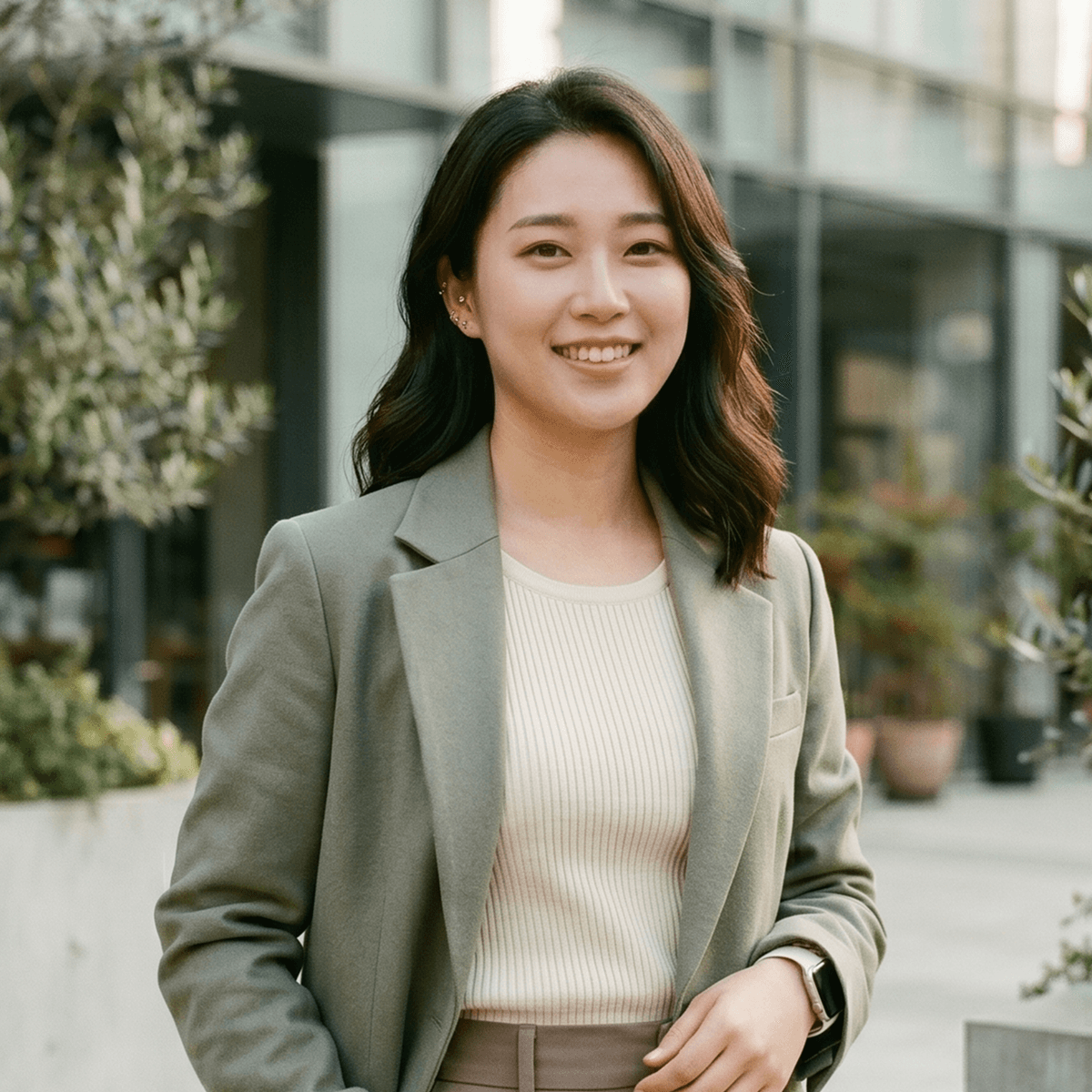
The Trend-Led Shopper
Social proof matters
Ji-woo tracks occasions and seasons. She appreciates recommendations that feel intentional and current.

The Efficient Buyer
Goal-oriented, low patience
Marcus shops with a specific need. He will abandon if the flow doesn't move fast enough.
The trust gap wasn't accuracy. It was silence
Across 12 interviews, shoppers weren't sceptical of AI recommendations because they thought the technology was wrong. They ignored them because nothing explained the thinking behind them. A recommendation without context felt arbitrary, and arbitrary doesn't convert
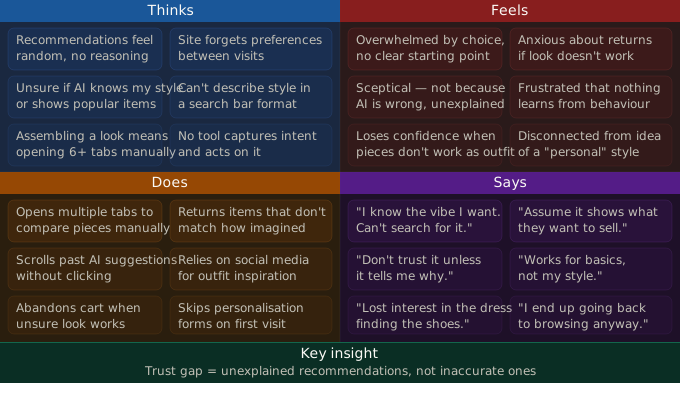
Empathy mapping across 12 participants.
Everyone had recommendations. Nobody showed their work
We mapped Stitch Fix, Zalando, Farfetch and Amazon across onboarding friction, recommendation transparency and AR depth. Tools that asked a lot upfront lost people before a result. Tools that asked nothing felt generic, and nobody showed its reasoning. That gap became Muse.
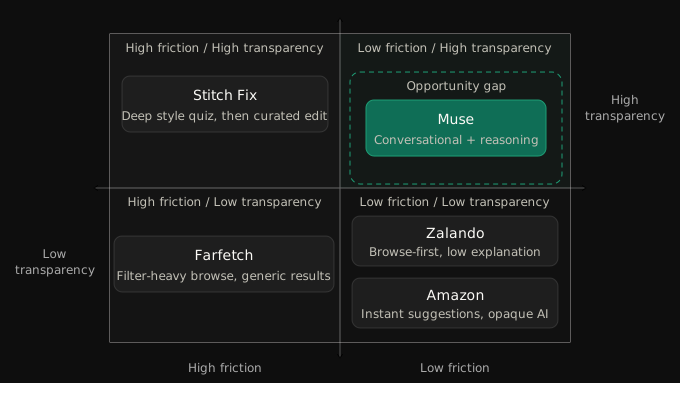
Competitor analysis across Stitch Fix, Zalando, Farfetch and Amazon.
What research confirmed
01
Trust requires explanation
Users didn't distrust AI recommendations because they were inaccurate. They ignored them because nothing explained the reasoning. Visible context was non-negotiable.
02
Style and body data are separate
Shoppers treat style preferences and body data as completely separate decisions. Asking about both in the same flow felt intrusive and caused drop-off before the experience had started. The two needed to be separate entry points.
03
Conversation over questionnaire
Open prompts felt low-effort and personal. Structured onboarding forms felt like admin. The format of the input shapes how willing users are to engage.
04
AR try-on converts at the decision point
Seeing an item on a body like yours was the most effective way to move from interest to purchase. The try-on needed to be one tap from the recommendation, not a separate flow.
Design
Designing the conversation, the curation, and the fitting room
Six weeks of design across sketches, wireframes, and high-fidelity screens.
Crazy 8s and sketching
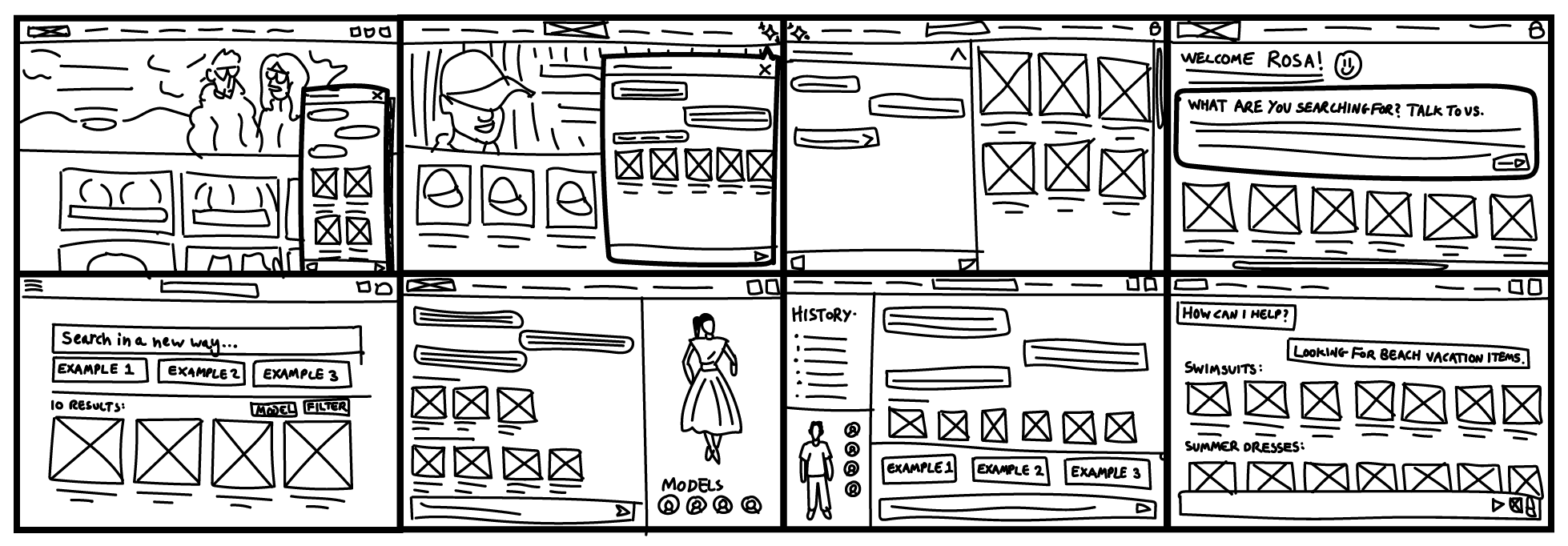
Eight directions explored in one session. From search-first to conversation-first, model selectors to product grids. The chat prompt and outfit reveal in the bottom right won out.
Wireframes and flow validation
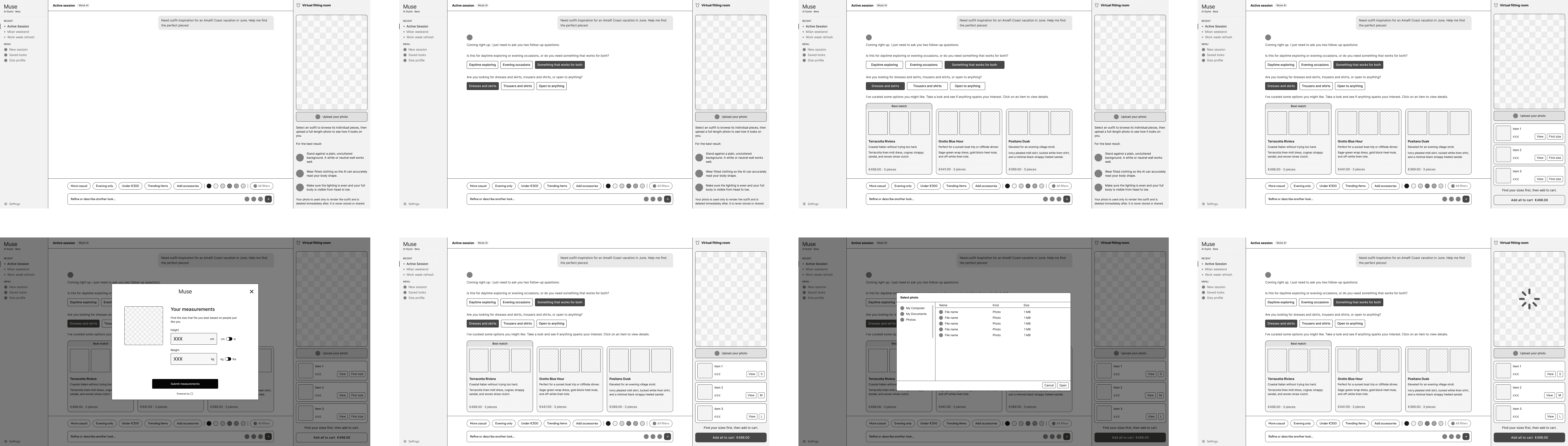
The full journey mapped and validated with the PM and engineering lead before moving to high fidelity.
A direction we tried and ruled out
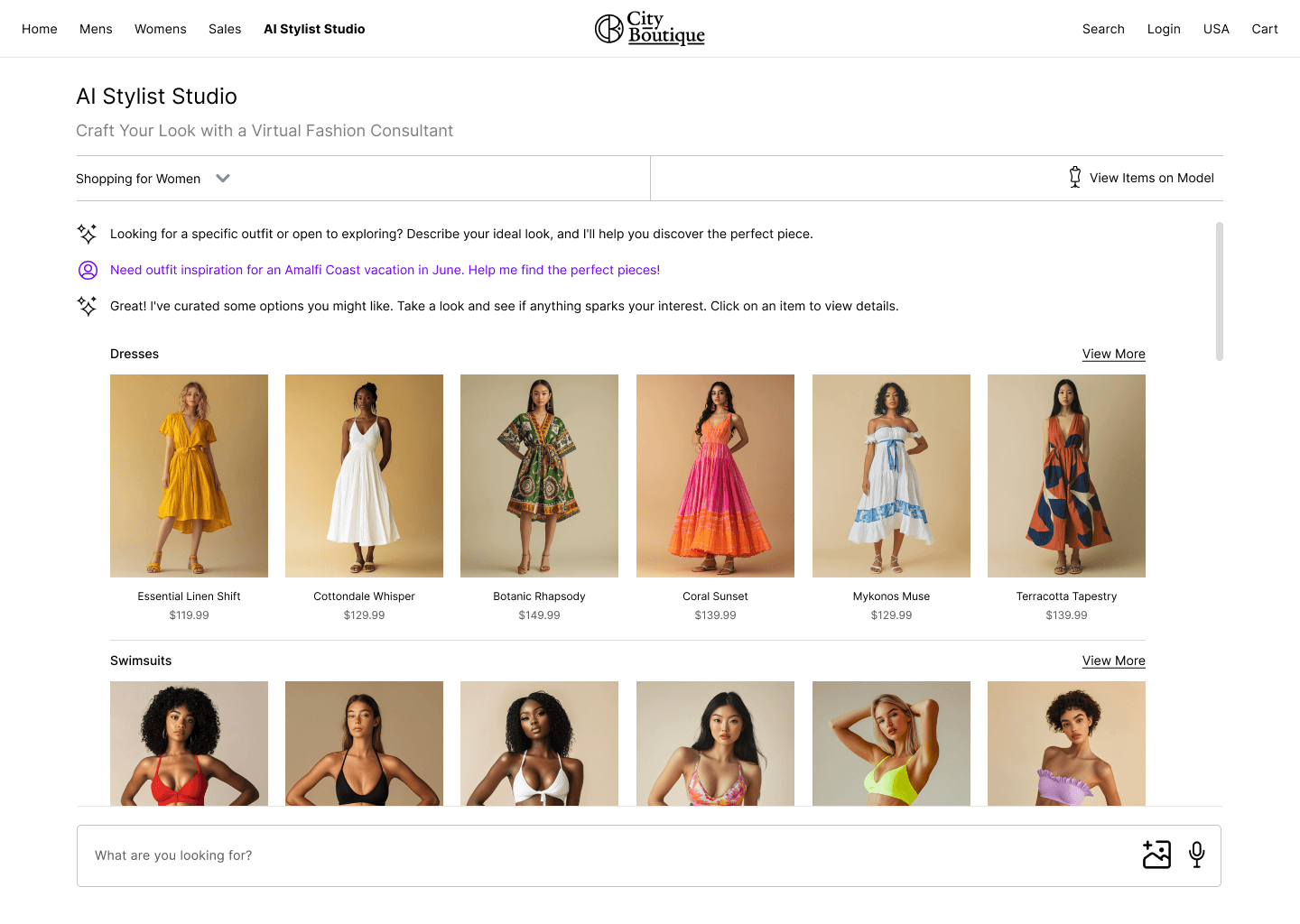
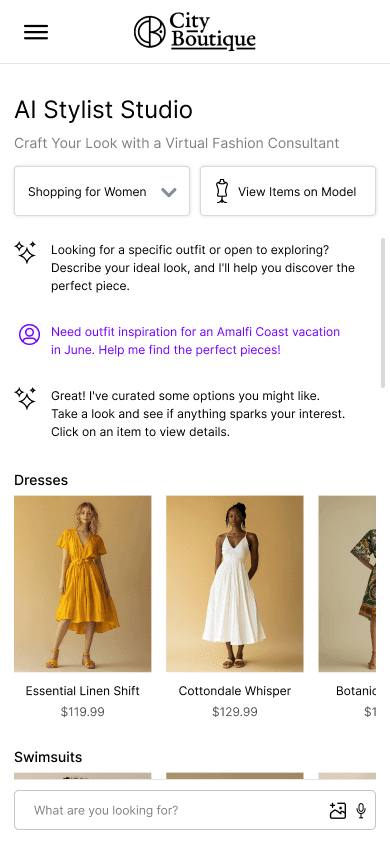
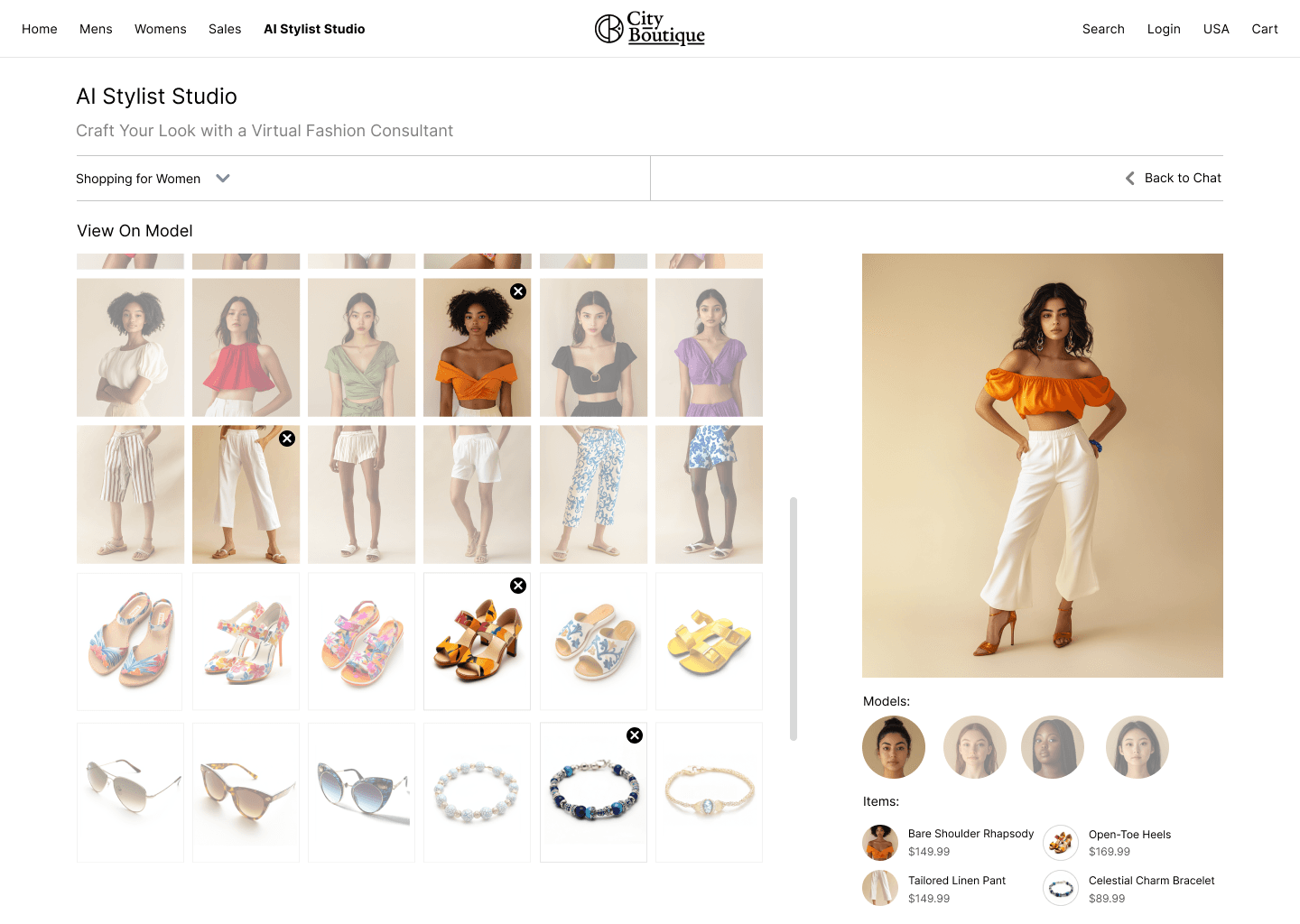
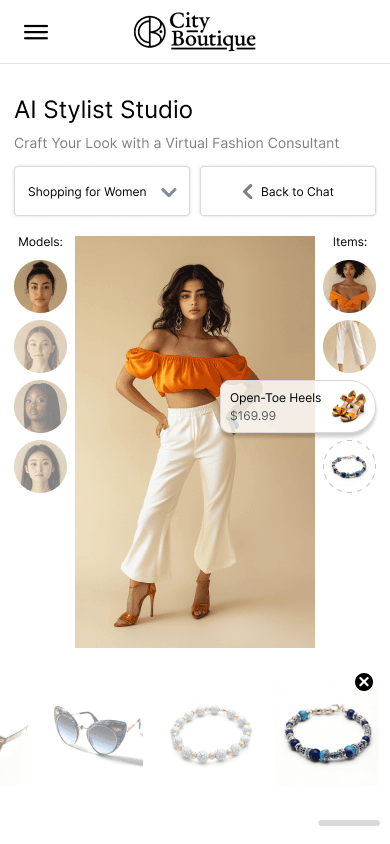
The earlier direction surfaced individual items by category, with a separate fitting room and a choice of generic models. No photo upload. Building an outfit meant users picking and pairing pieces manually. We scrapped it because the hard work was still on the shopper, the fitting room was a separate step, and generic models weren't personalisation.
The final design
Built within Snap's ARES Shopping Suite design system, the final concept runs across three connected surfaces: a conversational discovery interface, a virtual fitting room, and a Fit Finder integration for sizing.
Each surface was designed separately for desktop and mobile. Not as a responsive adaptation, but as two distinct layouts built around how people actually shop on each. On desktop, outfit cards sit side by side with a persistent chat sidebar. On mobile, cards stack full-width with reasoning tucked behind a tap. The fitting room goes from a three-panel layout on desktop to an 80% viewport preview on mobile with a bottom sheet for actions.
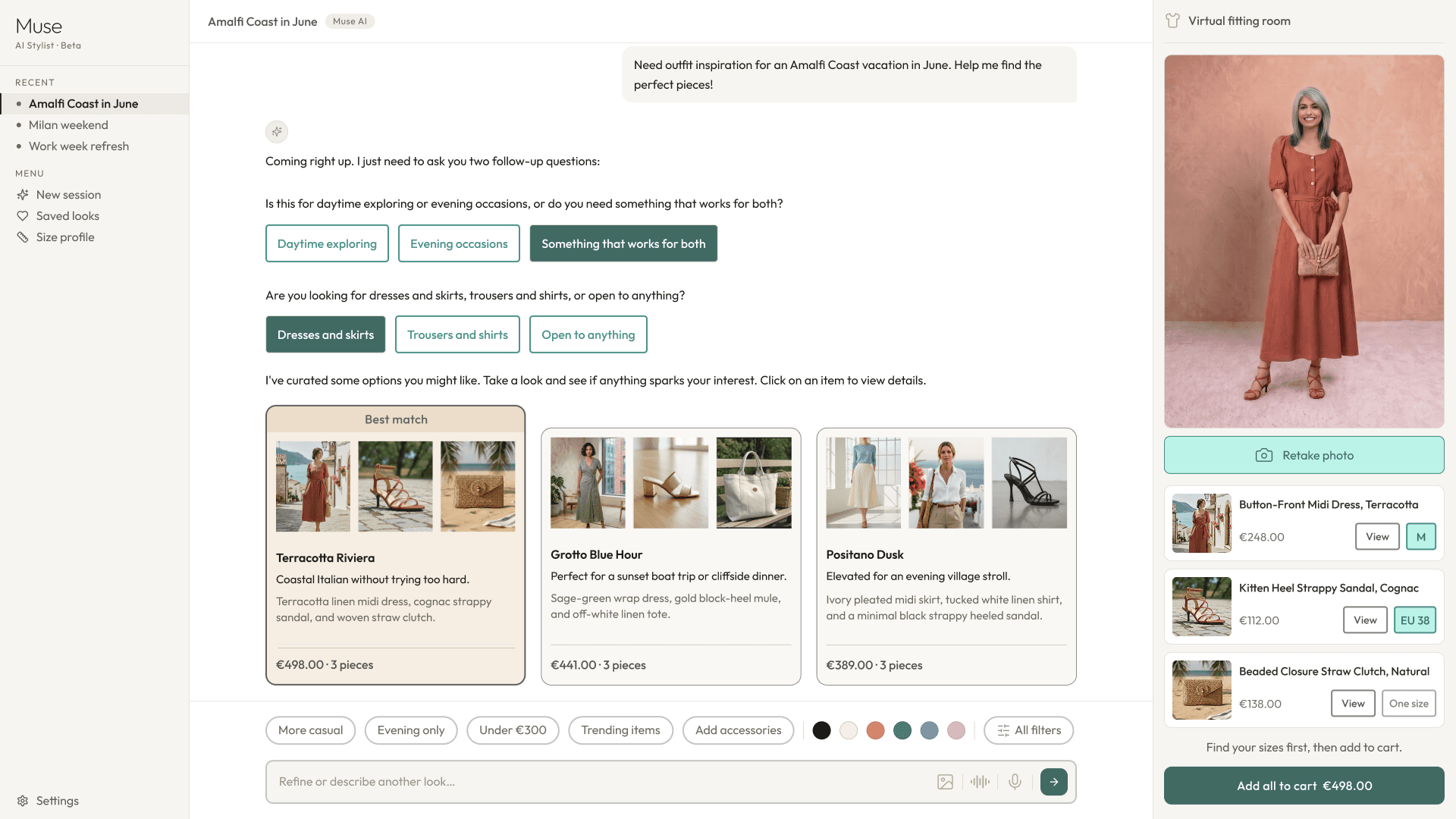
Desktop: persistent sidebar with chat history, outfit cards side-by-side, reasoning note visible beneath each look name.
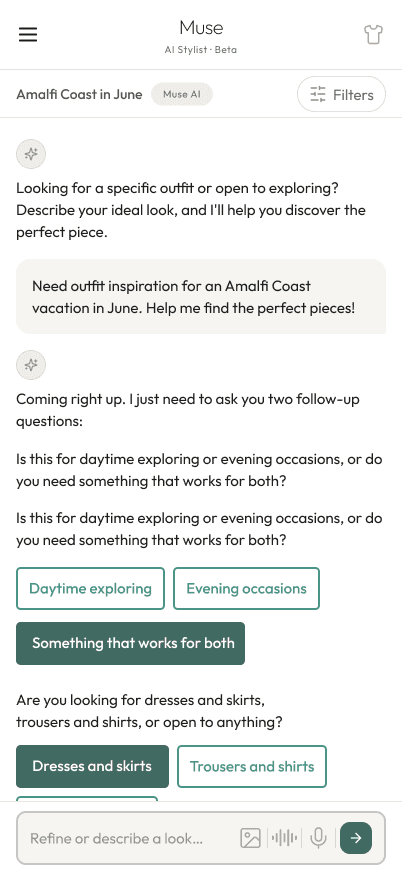
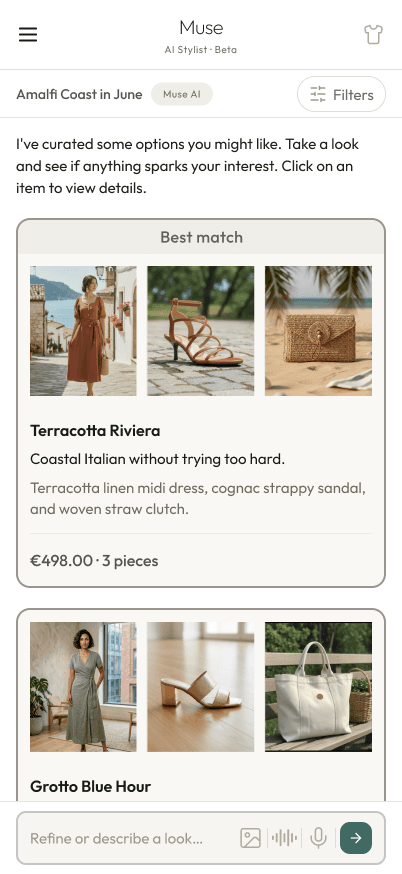
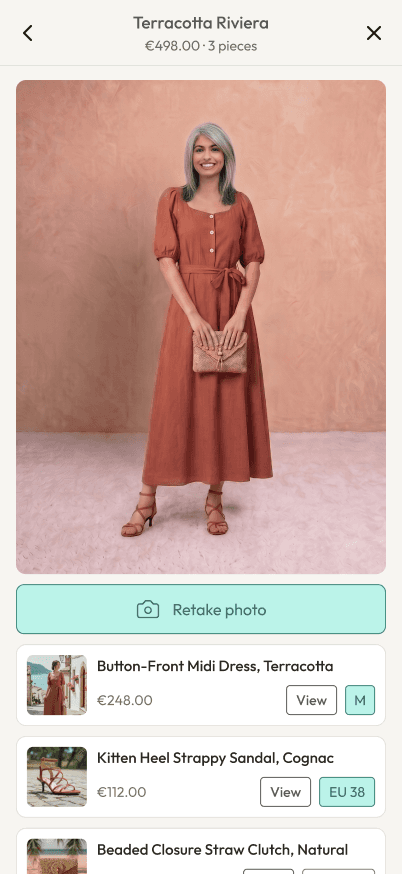
Mobile: stacked outfit cards, and a fitting room that keeps the look in view with actions beneath it.
The photo upload introduced a consent design problem. Uploaded photos qualify as biometric data under GDPR in several EU member states and under BIPA in Illinois, which meant a separate explicit consent step was needed directly before the upload UI, not bundled with general data consent. The EU and North American flows were designed separately rather than as a single global compromise. That work happened in week eight alongside Legal and Privacy.
Interaction
How the conversation becomes a purchase
The three surfaces only make sense as a connected sequence. Here is how a user moves through them, and the decisions that shaped each moment.
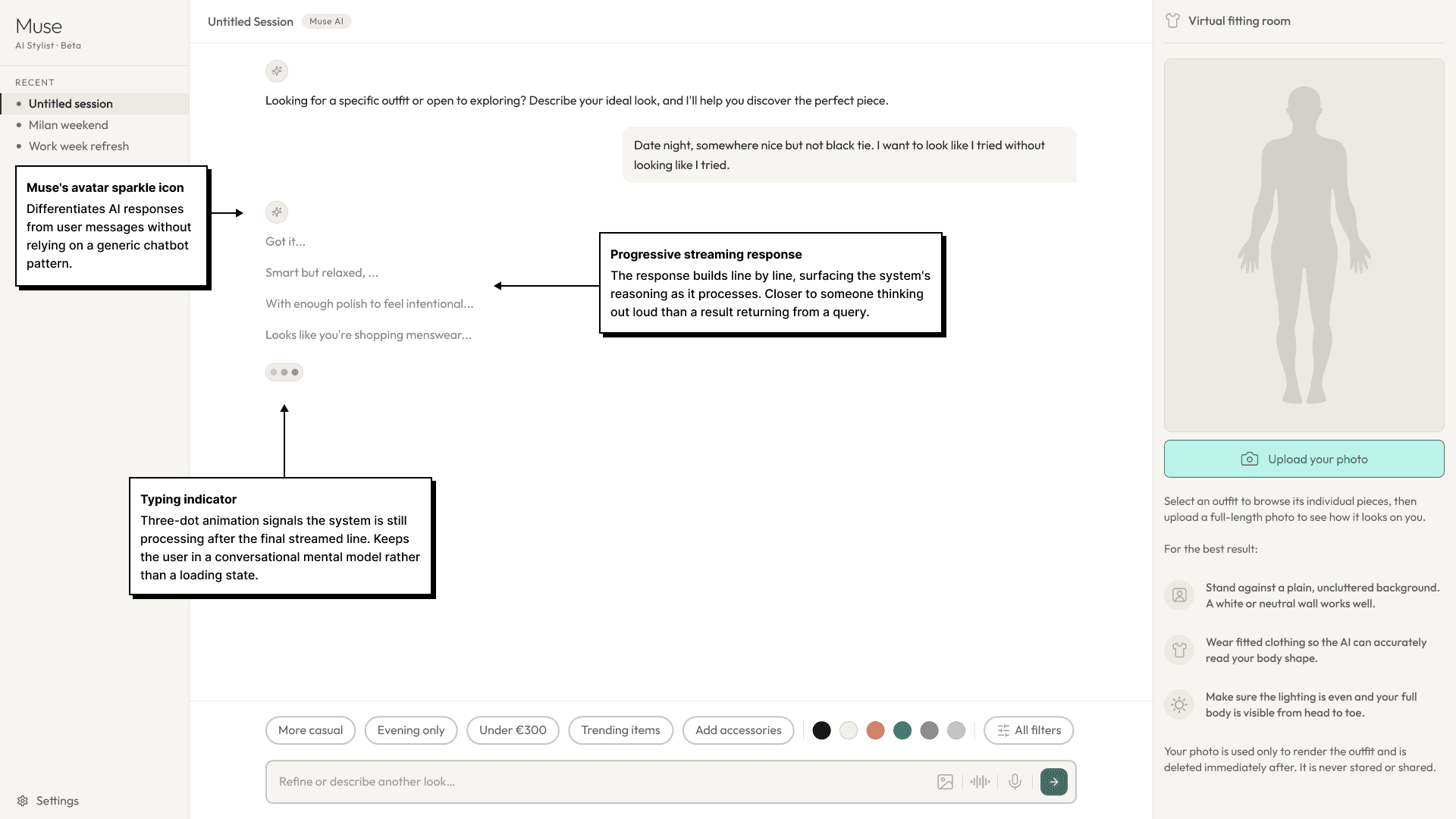
The user types a natural-language prompt or selects a chip. On send, the AI enters a visible streaming state: a typing indicator appears and the response builds progressively. An instant result feels like a filter. A streaming response feels like someone thinking. The distinction is small technically and significant experientially.
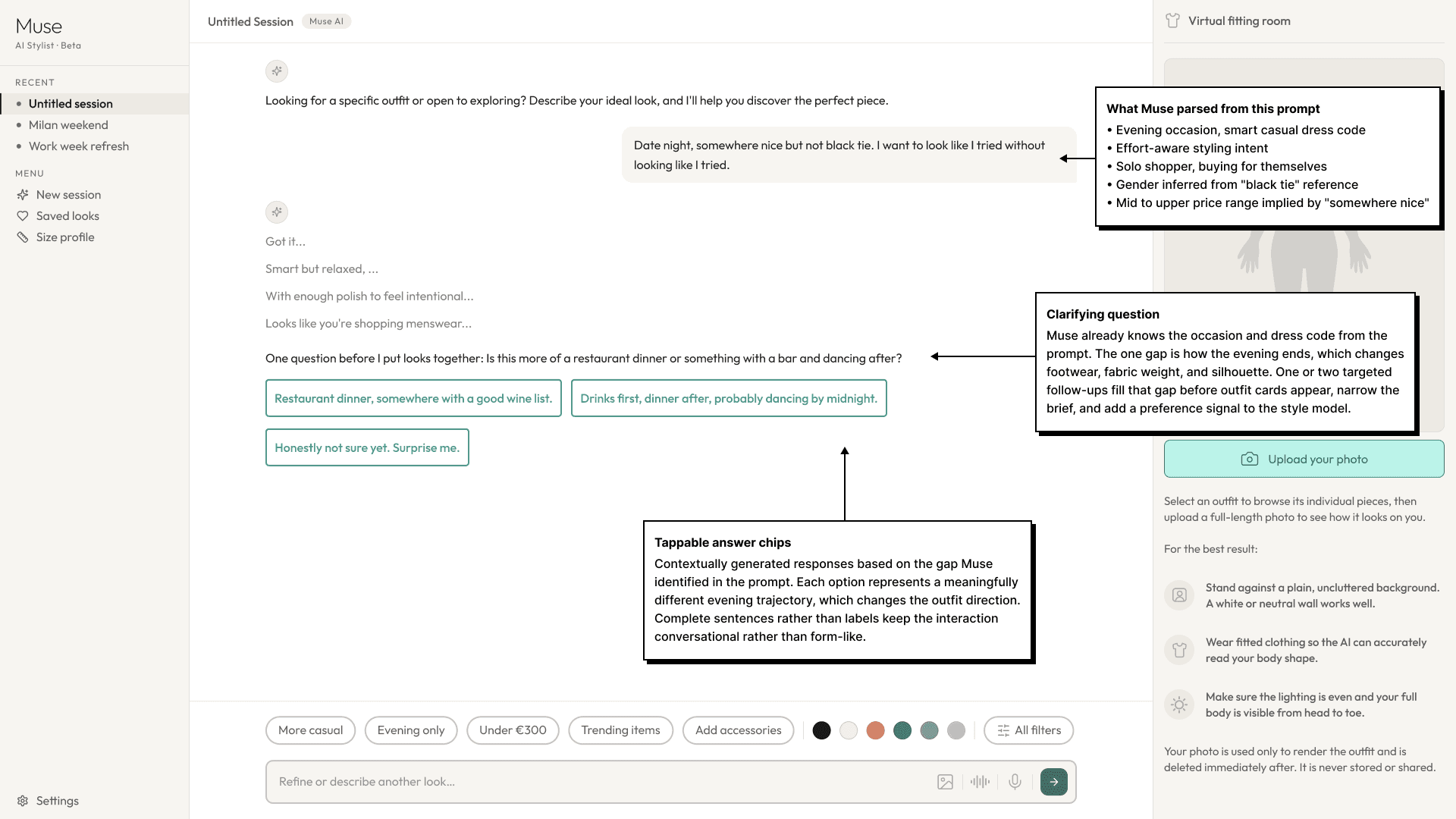
Before returning outfit looks, Muse may ask a single follow-up question to narrow the brief, "Is this more of a restaurant dinner or something with a bar and dancing after?" The answer refines the recommendations and adds a preference signal to the style model. This is also Muse's cold start solution: a first-time user with no history can be guided toward something specific through one question. The conversation is the onboarding.
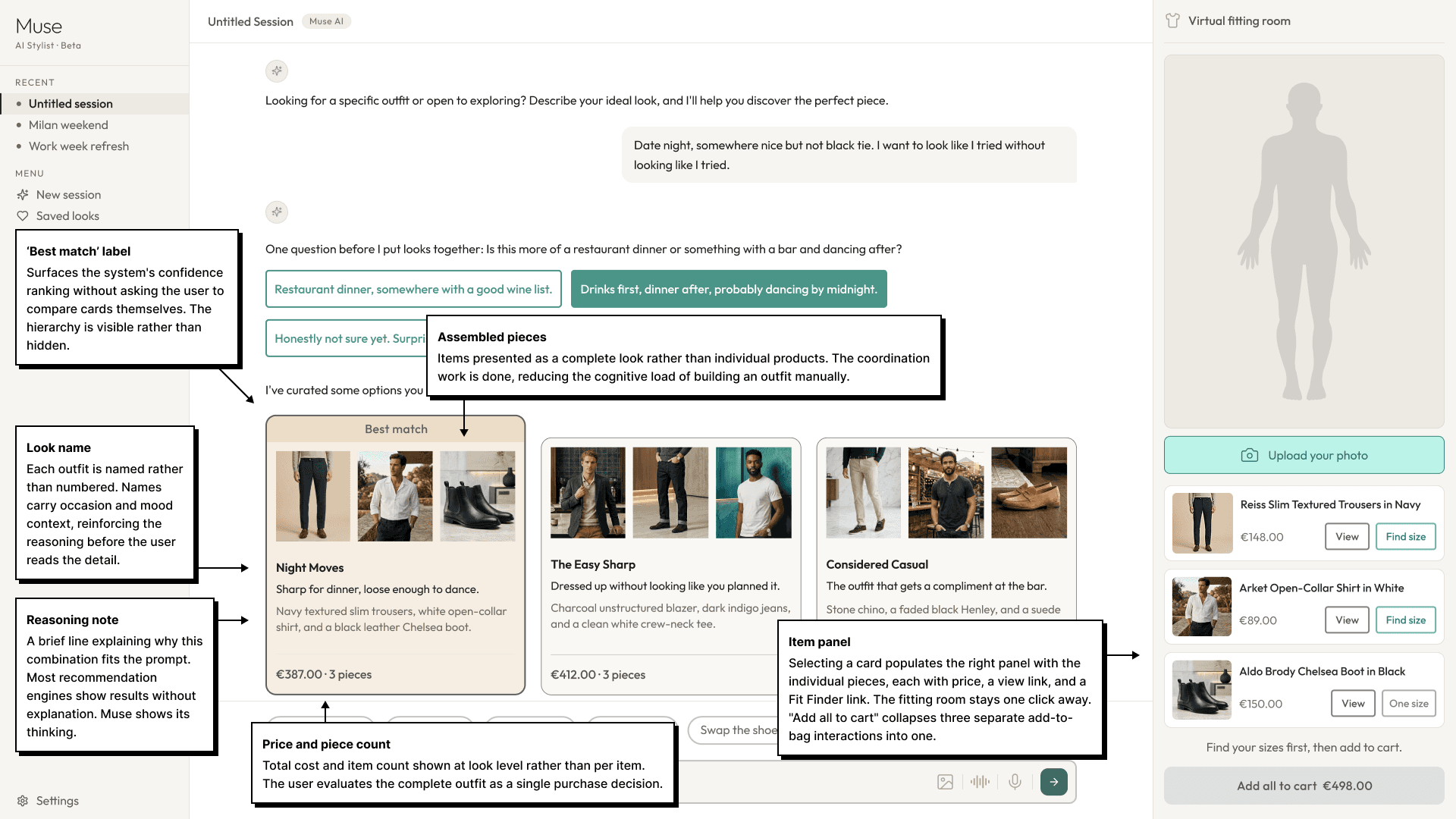
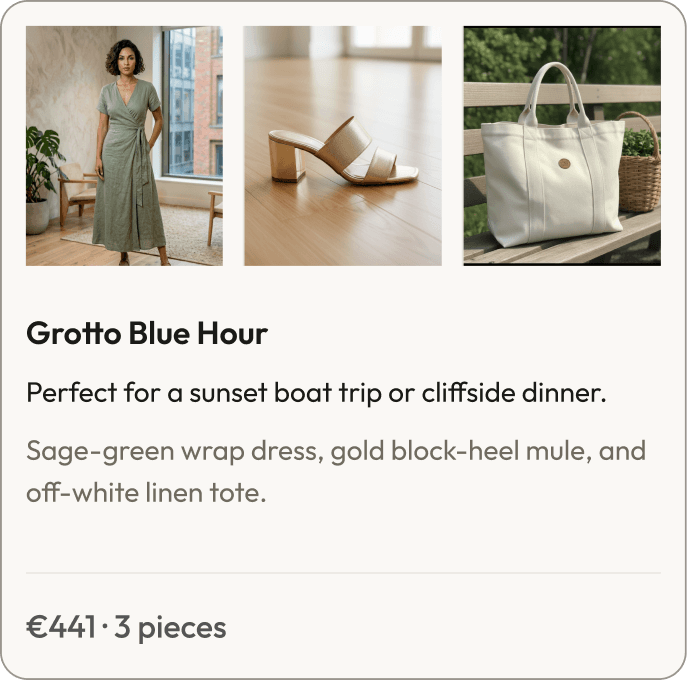
Two or three outfit cards appear, each with a look name, assembled pieces, total price, and a "Shop this look" CTA. A brief reasoning note sits beneath each name explaining why this combination fits the prompt. Every recommendation shows its work. This is the most important design decision in the entire flow and the clearest point of difference from every existing recommendation engine.
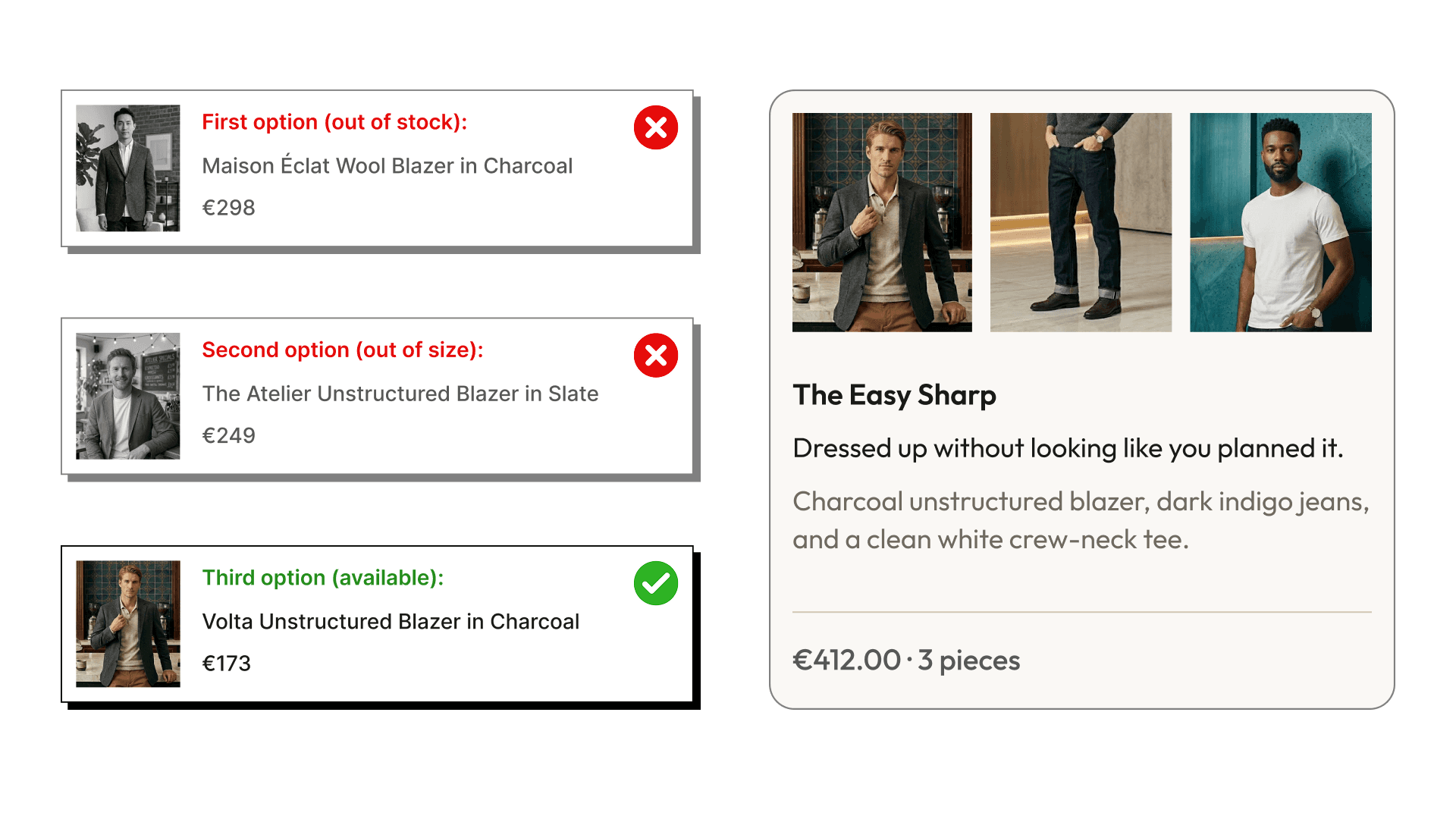
When an item in a recommended look is out of stock, Muse substitutes the look rather than surfacing an incomplete one. The next best complete and shoppable alternative is shown in its place. If Fit Finder has been completed, Muse filters by the user's size before surfacing any looks. On a first visit with no size data, looks are shown with a prompt to complete Fit Finder before adding to cart.
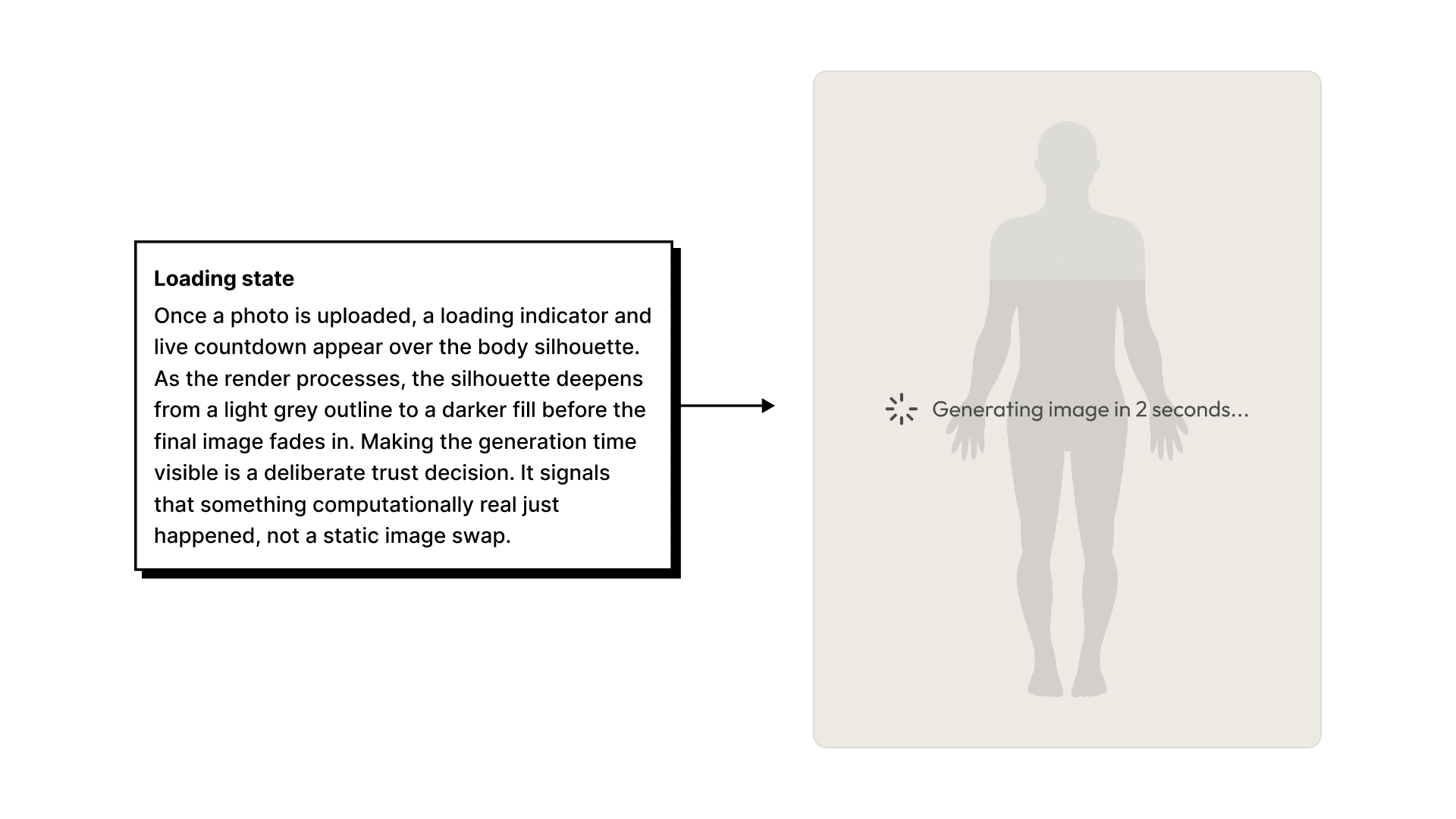
The fitting room leads with "Upload your photo" as the primary action. On upload, a loading indicator appears on the model frame alongside a live countdown timer. At approximately seven seconds the rendered image fades in. Making the generation time visible was a deliberate trust decision: it signals that something computationally real just happened, rather than a static image swap.
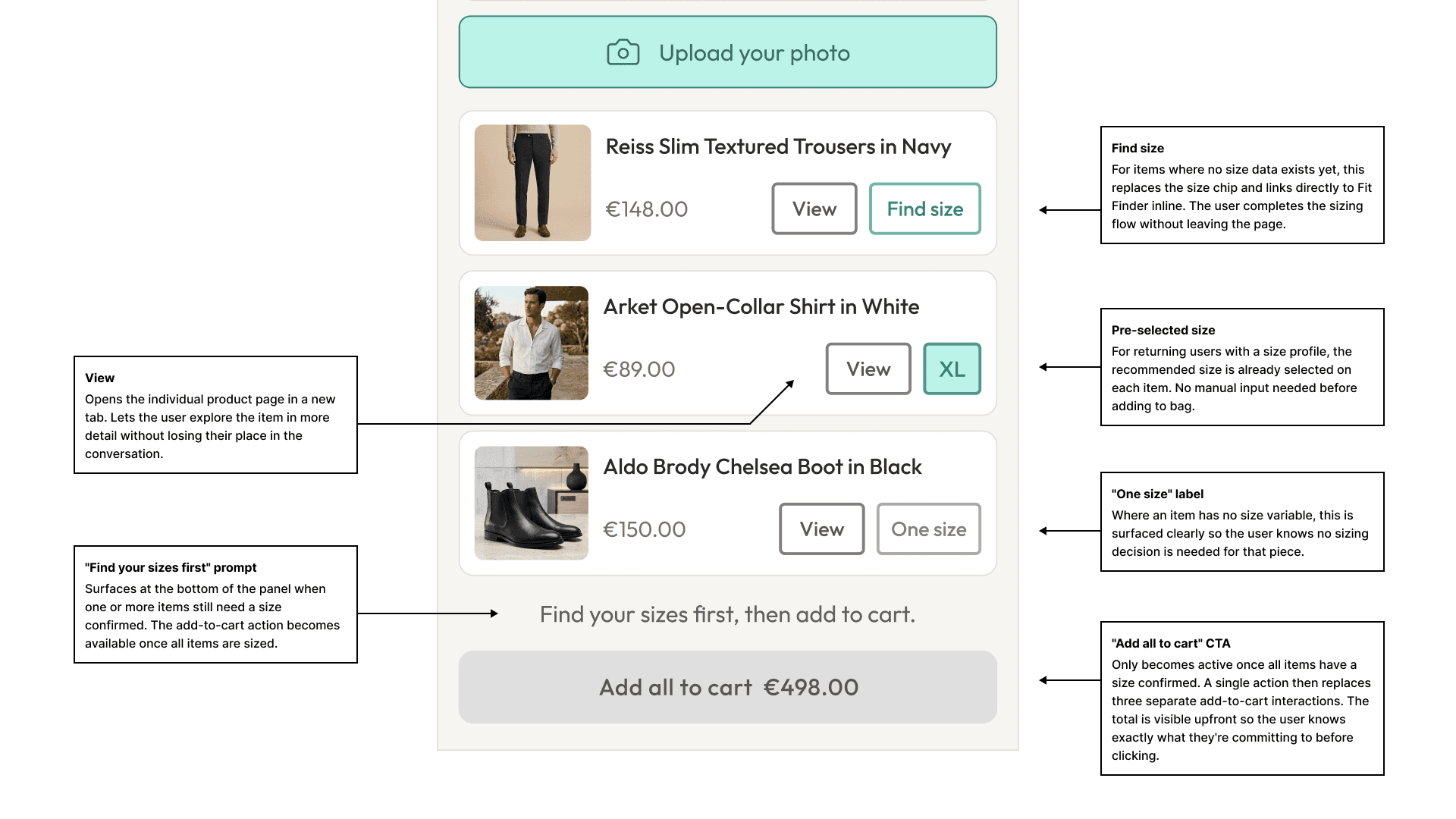
A single "Add all to cart" CTA replaces five separate add-to-cart interactions. For returning users with a size profile, their recommended size is pre-selected. For first-time users, clicking "Add all to cart" triggers the Fit Finder prompt inline. The user completes the short sizing flow and the item is added in the right size without leaving the page.
Muse doesn't rely on upfront profiling. It builds a style model from signals a user generates naturally as they interact: what they dwell on, what they skip, what they explicitly reject in a prompt. Session signals stay local to the conversation. Persistent ones, like adding to cart or completing Fit Finder, update a long-term profile across future sessions. After roughly three sessions the experience becomes meaningfully personalised. On a first visit, the conversational prompt and clarifying question stand in for history entirely.
Availability and sizing decision logic
Usability testing
What we learned from 12 participants
Moderated usability testing with 12 participants, recruited to reflect the three archetypes from research. Each was given the same scenario: find a complete outfit for a specific occasion using whichever tools the prototype offered. Sessions were conducted remotely using think-aloud protocol, with a second team member noting where participants hesitated or expressed uncertainty.
The most revealing moments weren't in the metrics. Several participants paused after seeing the outfit card reasoning note. Lines like 'Perfect for a sunset boat trip or cliffside dinner' landed exactly as intended. The reaction was consistent: 'oh, so it actually understood what I meant.'
The feature engagement gap was the most meaningful number. Users who tested Muse were significantly more likely to try both the fitting room and Fit Finder, not because they were prompted to, but because the outfit-first flow made those surfaces feel like natural next steps.
It's worth being honest about the limits here. Participants responded to static outfit cards with pre-written reasoning notes, not live AI-generated recommendations. What the test validated was the interaction model: that outfit-level curation, visible reasoning, and a connected fitting room created a more confident and engaged shopper. Whether the algorithm produces recommendations good enough to sustain that trust at scale is a question only a live A/B test can answer, which is exactly what the next phase was designed to address.
Reflection
What I'd do differently
A blank prompt was too much of a design bet for users who hadn't used anything like it before. I'd test prompt chips, suggested starting points, and a browse fallback before committing to the open-ended entry as the only path.
The clarifying exchange was added as a concept but not usability-tested in enough depth. I'd want to know how many users skip it, whether the question timing feels natural, and whether the visible effect on the outfit output is enough to make the exchange feel worthwhile.
Substitution was the right call, but the logic itself needed more testing than it got. How similar does a substitute need to be before it feels like a real alternative rather than a consolation? And should the swap be visible to the user or happen silently? Only live data can answer that.
Shifting to personal photo upload was the right direction. But the privacy and comfort implications, particularly GDPR biometric provisions in the EU and BIPA in Illinois, needed earlier legal alignment and more usability testing than the timeline allowed.
Signal collection happens silently. In retrospect I'd surface a lightweight "Here's what I've learned about your style" card after a few sessions. Personalisation that's visible gives users a sense of control over it, which closes the same trust gap identified in research.
Role and collaborators
What I owned and who I worked with
I was one of three designers who developed a competing proposal during the sprint. My responsibility covered the full end-to-end experience: research participation, ideation, wireframing, high-fidelity design across desktop and mobile, and prototype preparation for usability testing. The conversational discovery flow, the fitting room reframe from "View on Model" to personal photo upload, and the personalisation signal model were all decisions I owned and proposed. The privacy and consent architecture was developed collaboratively with Legal and Privacy in week eight.
Head of Product
Oversaw product strategy and ensured alignment with business goals across all three proposals.
Head of Design
Guided the overall design vision and facilitated bi-weekly critique sessions throughout the sprint.
User Researcher
Ran the interview programme, facilitated empathy mapping, and moderated the usability test sessions.
Data Scientists
Advised on signal weighting and provided the card sorting similarity matrix.
Engineers
Consulted throughout on feasibility, and scoped the MVP build estimate for the A/B test phase.
Legal and Privacy
Defined EU and North American consent requirements and reviewed the consent architecture.